An Example of the Usage of the Tufte-Handout StyleInspired by Edward R. Tufte!
This document describes the Tufte handout LaTeX document style, here rendered by the tufte.hugo theme. It also provides examples and comments on the style’s use. Only a brief overview is presented here; for a complete reference, see the sample book.
The Tufte-LaTeX document classes define a style similar to the
style Edward Tufte uses in his books and handouts. Tufte’s style is known
for its extensive use of sidenotes, tight integration of graphics with
text, and well-set typography. This document aims to be at once a
demonstration of the features of the Tufte-LaTeX document classes
and a style guide to their use.This page is a port of sample-handout.tex from the Tufte-LaTeX project. Every LaTeX construct is replaced by its Markdown or shortcode equivalent; the LaTeX to Hugo cheat sheet lists them all.
Page Layout#
Headings#
This style provides a- and b-heads (that is,
\section and \subsection, written ## and ### in Markdown), demonstrated above.
The Tufte-LaTeX classes will emit an error if you try to use
\subsubsection and smaller headings. This theme prints a warning
(tufte-heading-depth) for ##### and ######, or stops the build when
tufte.headings.strict is on.
In his later books,Edward R. Tufte. Beautiful Evidence. Graphics Press, LLC, first edition, May 2006. ISBN 0-9613921-7-7 Tufte
starts each section with a bit of vertical space, a non-indented paragraph,
and sets the first few words of the sentence in small caps. To
accomplish this using this style, use the newthought shortcode (LaTeX’s \newthought command):
\newthought{In his later books}, Tufte starts…
{{< newthought >}}In his later books{{< /newthought >}}, Tufte starts…Sidenotes#
One of the most prominent and distinctive features of this style is the
extensive use of sidenotes. There is a wide margin to provide ample room
for sidenotes and small figures. Any footnotes will automatically
be converted to sidenotes.This is a sidenote that was entered using a Markdown footnote, [^1], the equivalent of the \footnote command. If you’d like to place ancillary
information in the margin without the sidenote mark (the superscript
number), you can use the marginnote shortcode.This is a
margin note. Notice that there isn’t a number preceding the note, and
there is no number in the main text where this note was written.
The specification of the sidenote shortcode (LaTeX’s \sidenote command) is:
\sidenote[number][offset]{Sidenote text.}
{{< sidenote number="number" offset="offset" >}}Sidenote text.{{< /sidenote >}}
Both the number and offset arguments are optional. If you
provide a number argument, then that number will be used as the
sidenote number.This sidenote was given the number *; the next one is numbered as if this one did not exist. It will change the number of the current sidenote only and
will not affect the numbering sequence of subsequent sidenotes.
Sometimes a sidenote may run over the top of other text or graphics in the margin space. If this happens, you can adjust the vertical position of the sidenote by providing a dimension in the offset argument. Some examples of valid dimensions are:
1.0in    2.54cm    254mm    6\baselineskip    (LaTeX)
1.0in    2.54cm    254mm    6bl               (this theme: "bl" is one \baselineskip)
If the dimension is positive it will push the sidenote down the page; if the
dimension is negative, it will move the sidenote up the page.This sidenote was pushed down by one baseline with offset="1bl". It is not in sample-handout.tex, so it carries the mark † instead of a number, and the sidenotes keep the numbers of the original.
While both the number and offset arguments are optional, LaTeX requires them to be provided in order. To adjust the vertical position of the sidenote while leaving the sidenote number alone, use the following syntax:
\sidenote[][offset]{Sidenote text.}
{{< sidenote offset="offset" >}}Sidenote text.{{< /sidenote >}}
The empty brackets tell the \sidenote command to use the default
sidenote number; in Hugo, named parameters can simply be left out.
If you only want to change the sidenote number, however, you may completely omit the offset argument:
\sidenote[number]{Sidenote text.}
{{< sidenote number="number" >}}Sidenote text.{{< /sidenote >}}
The marginnote shortcode has a similar offset argument:
\marginnote[offset]{Margin note text.}
{{< marginnote offset="offset" >}}Margin note text.{{< /marginnote >}}References#
References are placed alongside their citations as sidenotes,
as well. This can be accomplished using the cite
shortcode (LaTeX’s \cite command).The first paragraph of this document includes a citation.
The complete list of references may also be printed automatically: on a
handout it is appended at the end of the page, like the \bibliography
command. (See the end of this document for an example.) If you do not want to
print a bibliography at the end of your document, set
tufte: {bibliography: {list: false}} in the front matter, the equivalent of
the \nobibliography command.
To enter multiple citations at one location,Edward R. Tufte. Beautiful Evidence. Graphics Press, LLC, first edition, May 2006. ISBN 0-9613921-7-7; and Edward R. Tufte. Envisioning Information. Graphics Press, Cheshire, Connecticut, 1990. ISBN 0-9613921-1-8 you can
provide a list of keys separated by commas and the same optional vertical
offset argument: {{< cite "tufte2006,tufte1990" >}}.
\cite[offset]{bibkey1,bibkey2,…}
{{< cite keys="bibkey1,bibkey2,…" offset="offset" >}}
Figures and Tables#
Images and graphics play an integral role in Tufte’s work. In addition to the standard figure and table environments, this style provides special figure and table environments for full-width floats.
Full page–width figures and tables may be placed with the fullwidthfigure
and fullwidthtable shortcodes (LaTeX’s figure* and table* environments). To
place figures or tables in the margin, use marginfigure (or fig with
type="margin") and margintable as follows (see figure 1):
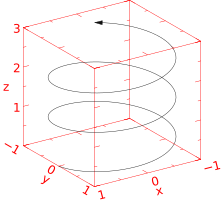 Figure 1: This is a margin figure. The helix is defined by , , and . The figure was drawn using Asymptote (http://asymptote.sf.net/).
{{< fig type="margin" src="helix.svg" label="fig:marginfig" >}}
This is a margin figure.
{{< /fig >}}
The margin figure and margin table shortcodes accept an optional parameter offset that adjusts the vertical position of the figure or table. See the “Sidenotes” section above for examples. The specifications are:
{{< marginfigure src="…" caption="…" offset="offset" >}}
{{< margintable caption="…" offset="offset" >}}
| a | b |
|---|---|
| … | … |
{{< /margintable >}}
Figure 2 is an example of the fullwidthfigure shortcode
(the figure* environment) and figure 3 is an
example of a normal figure.

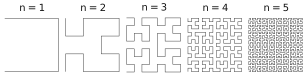
Table 1 shows a table in the style of the booktabs
package. Notice the lack of vertical rules—they serve only to clutter
the table’s data.
| Margin | Length |
|---|---|
| Paper width | 8½ inches |
| Paper height | 11 inches |
| Textblock width | 6½ inches |
| Textblock/sidenote gutter | ⅜ inches |
| Sidenote width | 2 inches |
Full-width text blocks#
In addition to the new float types, there is a fullwidth
shortcode (the fullwidth environment) that stretches across the main text
block and the sidenotes area.
{{< fullwidth >}}
Lorem ipsum dolor sit amet…
{{< /fullwidth >}}
Lorem ipsum dolor sit amet, consectetuer adipiscing elit. Ut purus elit, vestibulum ut, placerat ac, adipiscing vitae, felis. Curabitur dictum gravida mauris. Nam arcu libero, nonummy eget, consectetuer id, vulputate a, magna. Donec vehicula augue eu neque. Pellentesque habitant morbi tristique senectus et netus et malesuada fames ac turpis egestas. Mauris ut leo. Cras viverra metus rhoncus sem. Nulla et lectus vestibulum urna fringilla ultrices. Phasellus eu tellus sit amet tortor gravida placerat. Integer sapien est, iaculis in, pretium quis, viverra ac, nunc. Praesent eget sem vel leo ultrices bibendum. Aenean faucibus. Morbi dolor nulla, malesuada eu, pulvinar at, mollis ac, nulla. Curabitur auctor semper nulla. Donec varius orci eget risus. Duis nibh mi, congue eu, accumsan eleifend, sagittis quis, diam. Duis eget orci sit amet orci dignissim rutrum.
Typography#
Typefaces#
If the Palatino, Helvetica, and Bera Mono typefaces are
installed, the LaTeX style will use them automatically. Otherwise, it falls back on
the Computer Modern typefaces.On the web, this theme sets the text in ET Book, the sans-serif in Gill Sans (or a close substitute) and code in Consolas or a similar monospace.
Letterspacing#
This document class includes two new commands and some improvements on existing commands for letterspacing.
When setting strings of ALL CAPS or small caps, the
letterspacing—that is, the spacing between the letters—should be
increased slightly.Robert Bringhurst. The Elements of Typography. Hartley & Marks, 3.1 edition, 2005. ISBN 0-88179-205-5 The allcaps shortcode has proper letterspacing for
strings of FULL CAPITAL LETTERS, and the smallcaps shortcode
has letterspacing for small capital letters. These commands
will also automatically convert the case of the text to upper- or
lowercase, respectively.
The sc shortcode (LaTeX’s redefined \textsc) also includes
letterspacing. The case of its argument is left as is,
however. This allows one to use both uppercase and lowercase letters:
The Initial Letters Of The Words In This Sentence Are Capitalized.
Installation#
To install the Tufte-LaTeX classes, simply drop the
following files into the same directory as your .tex
file:
tufte-book.cls
tufte-common.def
tufte-handout.cls
tufte.bst
To install this Hugo theme instead, see the README.
More Documentation#
For more documentation on the Tufte-LaTeX document classes (including commands not mentioned in this handout), please see the sample book.
Support#
The website for the Tufte-LaTeX packages is located at https://github.com/Tufte-LaTeX/tufte-latex. On our website, you’ll find links to our svn repository, mailing lists, bug tracker, and documentation.
References
- Robert Bringhurst. The Elements of Typography. Hartley & Marks, 3.1 edition, 2005. ISBN 0-88179-205-5.
- Edward R. Tufte. Envisioning Information. Graphics Press, Cheshire, Connecticut, 1990. ISBN 0-9613921-1-8.
- Edward R. Tufte. Beautiful Evidence. Graphics Press, LLC, first edition, May 2006. ISBN 0-9613921-7-7.