Math and Code
KaTeX at build time, Chroma in the stylesheet, no JavaScript
Mathematics and source code are both set apart from prose, and both deserve the same care. tufte.hugo renders the first with KaTeX and the second with Chroma, at build time: the published page contains only HTML and CSS.
Inline math#
Write inline math between single dollar signs or between \( and \). Euler’s identity sits in the line of text, as does the binomial sum .Both delimiters are declared in the site configuration, under markup.goldmark.extensions.passthrough; Hugo does not merge [markup] from a theme. Greek letters such as , and match the weight of the surrounding ET Book reasonably well.
Because a single dollar sign starts a formula, a site that often talks about prices may prefer to keep only \(…\) for inline math.
Display math#
Display math goes between $$ or between \[ and \], on lines of its own. It is centred within the text column, like a paragraph:
Multi-line derivations use the usual environments:
and matrices work as well:
The KaTeX stylesheet is loaded only on pages that contain math.With params.math.enable = "auto" the theme notices the first formula on a page and adds the stylesheet to that page’s head. Set it to true to load it everywhere, or false to never load it. Pages without formulas, like most of this site, stay as light as plain Tufte CSS.
Macros and equation numbers#
Macros keep notation short and consistent. The site defines \RR, \NN and \abs in params.math.macros, and this page adds \E and \Var in its front matter (mathMacros), so , and need no preamble.Hugo lowercases the keys of maps in the configuration and in front matter, so macros are written as a list of pairs, [["\\RR", "\\mathbb{R}"]], which keeps the capital letters. Equations are numbered as in LaTeX, with a \label inside the display:
The theme numbers every labelled display in order, with one counter for the page (for the whole book in a book), sets the number at the right edge of the text column (at the left edge with params.math.leqno = true), and {{< eqref "eq:variance" >}} prints it, (1), wherever the text refers to it, as \eqref does. The equation shortcode does the same for a formula written between {{< equation label="eq:x" >}} and {{< /equation >}}; the Equations section of the LaTeX cheat sheet shows both. KaTeX’s own environments (equation, align, gather) number their rows too, but with a counter of KaTeX’s that runs through the web page and knows nothing of the theme’s, so the same number could appear twice: use \label or the shortcode for numbered equations, and align*, aligned or gathered for the others (in a display with a \label, the theme hides KaTeX’s row numbers). Write \tag{…} only for a fixed tag, which no counter changes:
With a \label, as in amsmath, the tag is the equation’s number: {{< eqref "eq:euler-tag" >}} prints (A.1), and the counter does not step. KaTeX sets such a tag at the right edge as well; params.math.leqno = true moves all equation numbers, the theme’s \label numbers and KaTeX’s tags alike, to the left, and params.math.fleqn = true sets display math flush left.
Math in captions#
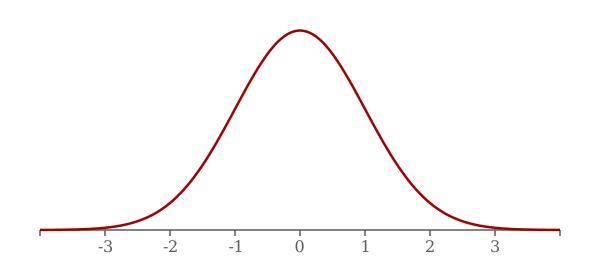
Figure captions are Markdown too, so they can hold math, with the macros of the page:
Code#
Inline code such as hugo server --themesDir ../.. uses the monospace stack of Tufte CSS. Fenced code blocks are highlighted by Hugo:
package main

import "fmt"

// Fibonacci returns the n-th Fibonacci number.
func Fibonacci(n int) int {
	a, b := 0, 1
	for i := 0; i < n; i++ {
		a, b = b, a+b
	}
	return a
}

func main() {
	fmt.Println(Fibonacci(10))
}
Colours come from syntax.css, which has a light and a dark palette that follow the reader’s system preference. The theme expects class-based output, so the site sets markup.highlight.noClasses = false.
Hugo’s highlighting options are written after the language name. This Python block has inline line numbers and highlights its third line:
1def fixed_point(f, x, tolerance=1e-10):
2    while True:
3        y = f(x)
4        if abs(y - x) < tolerance:
5            return y
6        x = y
A long listing can take the whole width of the page with the fullwidth class:
;; side-effecty loop (unformatted, causing text overflow) - from https://clojuredocs.org/clojure.core/doseq
(doseq [[[a b] [c d]] (map list (sorted-map :1 1 :2 2) (sorted-map :3 3 :4 4))] (prn (* b d)))
Configuration files are code too:
[markup.goldmark.extensions.passthrough]
  enable = true
  [markup.goldmark.extensions.passthrough.delimiters]
    block = [['\[', '\]'], ['$$', '$$']]
    inline = [['\(', '\)'], ['$', '$']]
and so are shell sessions:
git submodule add https://github.com/massimo-nocentini/tufte.hugo themes/tufte.hugo
hugo server
Math inside notes#
Formulas work inside sidenotes and margin notes, since their text is rendered as Markdown.The golden ratio is . Keep them inline: a display formula does not fit in a margin.