On the Use of the tufte-book Document Class
The Tufte-LaTeX document classes define a style similar to the style Edward Tufte uses in his books and handouts. Tufte’s style is known for its extensive use of sidenotes, tight integration of graphics with text, and well-set typography. This document aims to be at once a demonstration of the features of the Tufte-LaTeX document classes and a style guide to their use.
Page Layout#
Headings#
This style provides a- and b-heads (that is,
\section and \subsection; ## and ### in Markdown), demonstrated above.
If you need more than two levels of section headings, you’ll have to define
them yourself at the moment; there are no pre-defined styles for anything below
a \subsection. As Bringhurst points out in The Elements of
Typographic Style,Robert Bringhurst. The Elements of Typography. Hartley & Marks, 3.1 edition, 2005. ISBN 0-88179-205-5 you should “use as many levels of
headings as you need: no more, and no fewer.”
The Tufte-LaTeX classes will emit an error if you try to use
\subsubsection and smaller headings. This theme warns about ##### and
###### (warning id tufte-heading-depth).
In his later books,Edward R. Tufte. Beautiful Evidence. Graphics Press, LLC, first edition, May 2006. ISBN 0-9613921-7-7 Tufte
starts each section with a bit of vertical space, a non-indented paragraph,
and sets the first few words of the sentence in small caps. To
accomplish this using this style, use the newthought shortcode:
{{< newthought >}}In his later books{{< /newthought >}}, Tufte starts…Sidenotes#
One of the most prominent and distinctive features of this style is the
extensive use of sidenotes. There is a wide margin to provide ample room
for sidenotes and small figures. Any footnotes will automatically
be converted to sidenotes.This is a sidenote that was entered using a Markdown footnote, the equivalent of the \footnote command. If you’d like to place ancillary
information in the margin without the sidenote mark (the superscript
number), you can use the marginnote shortcode.This is a
margin note. Notice that there isn’t a number preceding the note, and
there is no number in the main text where this note was written.
The specification of the sidenote shortcode is:
{{< sidenote number="number" offset="offset" >}}Sidenote text.{{< /sidenote >}}Both the number and offset arguments are optional. If you provide a number argument, then that number will be used as the sidenote number. It will change the number of the current sidenote only and will not affect the numbering sequence of subsequent sidenotes.
Sometimes a sidenote may run over the top of other text or graphics in the margin space. If this happens, you can adjust the vertical position of the sidenote by providing a dimension in the offset argument. Some examples of valid dimensions are:
1.0in 2.54cm 254mm 6blwhere bl is one \baselineskip (2rem). If the dimension is positive it will push the sidenote down the page; if the
dimension is negative, it will move the sidenote up the page.
While both the number and offset arguments are optional, in LaTeX they must be provided in order. To adjust the vertical position of the sidenote while leaving the sidenote number alone, use the following syntax:
{{< sidenote offset="offset" >}}Sidenote text.{{< /sidenote >}}The parameters are named, so leaving one out tells the sidenote shortcode to use the default
sidenote number.
If you only want to change the sidenote number, however, you may completely omit the offset argument:
{{< sidenote number="number" >}}Sidenote text.{{< /sidenote >}}The marginnote shortcode has a similar offset argument:
{{< marginnote offset="offset" >}}Margin note text.{{< /marginnote >}}References#
References are placed alongside their citations as sidenotes,
as well. This can be accomplished using the cite
shortcode.The first paragraph of this document includes a citation.
The complete list of references may also be printed automatically by using
the bibliography shortcode. (See the end of this document for an
example.) If you do not want to print a bibliography at the end of your
document, set tufte.bibliography.list = false, the equivalent of the
\nobibliography command.
To enter multiple citations at one location,Edward R. Tufte. Beautiful Evidence. Graphics Press, LLC, first edition, May 2006. ISBN 0-9613921-7-7; and Edward R. Tufte. Envisioning Information. Graphics Press, Cheshire, Connecticut, 1990. ISBN 0-9613921-1-8 you can
provide a list of keys separated by commas and the same optional vertical
offset argument: {{< cite "tufte2006,tufte1990" >}}.
{{< cite keys="bibkey1,bibkey2,…" offset="offset" >}}Figures and Tables#
Images and graphics play an integral role in Tufte’s work.
In addition to the standard figure and table shortcodes,
this style provides special figure and table shortcodes for full-width
floats.
Full page–width figures and tables may be placed with the
fullwidthfigure or
fullwidthtable shortcodes. To place figures or tables in the margin,
use marginfigure or
margintable as follows
(see figure 1):
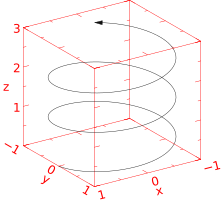 Figure 1: This is a margin figure. The helix is defined by , , and . The figure was drawn using Asymptote (http://asymptote.sf.net/).
{{< fig type="margin" src="helix.svg" label="fig:marginfig" >}}
This is a margin figure.
{{< /fig >}}
The marginfigure and margintable shortcodes accept an optional parameter
offset that adjusts the vertical position of the figure or table. See the
“Sidenotes” section above for examples. The specifications are:
{{< marginfigure src="…" caption="…" offset="offset" >}}
{{< margintable caption="…" offset="offset" >}}
…
{{< /margintable >}}
Figure 2 is an example of the fullwidthfigure shortcode
and figure 3 is an example of the normal
figure shortcode.

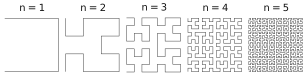
As with sidenotes and marginnotes, a caption may sometimes require vertical adjustment. The caption now takes a second optional argument that enables you to do this by providing a dimension offset. You may specify the caption in any one of the following forms:
{{< fig src="…" >}}long caption{{< /fig >}}
{{< fig src="…" short="short caption" >}}long caption{{< /fig >}}
{{< fig src="…" offset="offset" >}}long caption{{< /fig >}}
{{< fig src="…" short="short caption" offset="offset" >}}long caption{{< /fig >}}
A positive offset will push the caption down the page. The short caption, if provided, is what appears in the list of figures/tables, otherwise the “long” caption appears there. In LaTeX the arguments short caption and offset must be provided in order; here they are named parameters. As an example, the caption to figure 3 above was given in the form
{{< fig src="hilbertcurves.svg" short="Hilbert curves…" offset="6pt" >}}Hilbert curves…{{< /fig >}}Table 4 shows a table in the style of the booktabs
package. Notice the lack of vertical rules—they serve only to clutter
the table’s data.
| Margin | Length |
|---|---|
| Paper width | 8½ inches |
| Paper height | 11 inches |
| Textblock width | 6½ inches |
| Textblock/sidenote gutter | ⅜ inches |
| Sidenote width | 2 inches |
Occasionally LaTeX will generate an error message:
Error: Too many unprocessed floatsLaTeX tries to place floats in the best position on the page. Until it’s finished composing the page, however, it won’t know where those positions are. If you have a lot of floats on a page (including sidenotes, margin notes, figures, tables, etc.), LaTeX may run out of “slots” to keep track of them and will generate the above error.
LaTeX initially allocates 18 slots for storing floats. To work around this
limitation, the Tufte-LaTeX document classes provide a \morefloats command
that will reserve more slots.
The first time \morefloats is called, it allocates an additional 34
slots. The second time \morefloats is called, it allocates another 26
slots.
The \morefloats command may only be used two times. Calling it a
third time will generate an error message. (This is because we can’t safely
allocate many more floats or LaTeX will run out of memory.)
If, after using the \morefloats command twice, you continue to get the
Too many unprocessed floats error, there are a couple things you can
do.
The \FloatBarrier command will immediately process all the floats
before typesetting more material. Since \FloatBarrier will start a new
paragraph, you should place this command at the beginning or end of a
paragraph. Its web counterpart is the clearmargin shortcode, which pushes
what follows below everything already in the margin.
The \clearpage command will also process the floats before
continuing, but instead of starting a new paragraph, it will start a new page.
The clearpage shortcode starts a new page when printing.
You can also try moving your floats around a bit: move a figure or table to the next page or reduce the number of sidenotes. (Each sidenote actually uses two slots.)
After the floats have placed, LaTeX will mark those slots as unused so they are available for the next page to be composed.
Captions#
You may notice that the captions are sometimes misaligned. Due to the way LaTeX’s float mechanism works, we can’t know for sure where it decided to put a float. Therefore, the Tufte-LaTeX document classes provide commands to override the caption position.
Vertical alignment#
To override the vertical alignment, use the
\setfloatalignment command inside the float environment, or the captionpos
parameter of the figure shortcodes. For example:
\begin{figure}[btp]
  \includegraphics{sinewave}
  \caption{This is an example of a sine wave.}
  \label{fig:sinewave}
  \setfloatalignment{b}% forces caption to be bottom-aligned
\end{figure}
In this theme the same figure is written:
{{< figure src="sinewave.svg" caption="This is an example of a sine wave." label="fig:sinewave" captionpos="bottom" >}}The syntax of the \setfloatalignment command is:
\setfloatalignment{pos}where pos can be either b for bottom-aligned
captions, or t for top-aligned captions (captionpos="bottom" or "top").
Horizontal alignment#
To override the horizontal alignment, use either the \forceversofloat
or the \forcerectofloat command inside of the float environment. For
example:
\begin{figure}[btp]
  \includegraphics{sinewave}
  \caption{This is an example of a sine wave.}
  \label{fig:sinewave}
  \forceversofloat% forces caption to be set to the left of the float
\end{figure}
The \forceversofloat command causes the algorithm to assume the
float has been placed on a verso page—that is, a page on the left side of a
two-page spread. Conversely, the \forcerectofloat command causes
the algorithm to assume the float has been placed on a recto page—that is, a
page on the right side of a two-page spread. A web page has no spreads, so
captions always sit in the right margin and these commands have no
counterpart in this theme.
Full-width text blocks#
In addition to the new float types, there is a fullwidth
shortcode that stretches across the main text block and the sidenotes
area.
{{< fullwidth >}}
Lorem ipsum dolor sit amet…
{{< /fullwidth >}}
Lorem ipsum dolor sit amet, consectetuer adipiscing elit. Ut purus elit, vestibulum ut, placerat ac, adipiscing vitae, felis. Curabitur dictum gravida mauris. Nam arcu libero, nonummy eget, consectetuer id, vulputate a, magna. Donec vehicula augue eu neque. Pellentesque habitant morbi tristique senectus et netus et malesuada fames ac turpis egestas. Mauris ut leo. Cras viverra metus rhoncus sem. Nulla et lectus vestibulum urna fringilla ultrices. Phasellus eu tellus sit amet tortor gravida placerat. Integer sapien est, iaculis in, pretium quis, viverra ac, nunc. Praesent eget sem vel leo ultrices bibendum. Aenean faucibus. Morbi dolor nulla, malesuada eu, pulvinar at, mollis ac, nulla. Curabitur auctor semper nulla. Donec varius orci eget risus. Duis nibh mi, congue eu, accumsan eleifend, sagittis quis, diam. Duis eget orci sit amet orci dignissim rutrum.
Typography#
Typefaces#
If the Palatino, Helvetica, and Bera Mono typefaces are installed, this style
will use them automatically. Otherwise, we’ll fall back on the Computer Modern
typefaces.
Letterspacing#
This document class includes two new commands and some improvements on existing commands for letterspacing.
When setting strings of ALL CAPS or small caps, the
letterspacing—that is, the spacing between the letters—should be
increased slightly.Robert Bringhurst. The Elements of Typography. Hartley & Marks, 3.1 edition, 2005. ISBN 0-88179-205-5 The allcaps shortcode has proper letterspacing for
strings of FULL CAPITAL LETTERS, and the smallcaps shortcode
has letterspacing for small capital letters. These commands
will also automatically convert the case of the text to upper- or
lowercase, respectively.
The sc shortcode (LaTeX’s redefined \textsc) also includes
letterspacing. The case of its argument is left as is,
however. This allows one to use both uppercase and lowercase letters:
The Initial Letters Of The Words In This Sentence Are Capitalized.
Document Class Options#
The tufte-book class is based on the LaTeX book
document class. Therefore, you can pass any of the typical book
options. There are a few options that are specific to the
tufte-book document class, however. In this theme they are keys of
[params.tufte] (or of the tufte: front matter); the table at the end
of this section lists them.
The a4paper option will set the paper size to A4 instead of
the default US letter size.
The sfsidenotes option will set the sidenotes and title block in a
sans serif typeface instead of the default roman.
The twoside option will modify the running heads so that the page
number is printed on the outside edge (as opposed to always printing the page
number on the right-side edge in oneside mode).
The symmetric option typesets the sidenotes on the outside edge of
the page. This is how books are traditionally printed, but is contrary to
Tufte’s book design which sets the sidenotes on the right side of the page.
This option implicitly sets the twoside option.
The justified option sets all the text fully justified (flush left
and right). The default is to set the text ragged right.
The body text of Tufte’s books are set ragged right. This prevents
needless hyphenation and makes it easier to read the text in the slightly
narrower column.
The bidi option loads the bidi package which is used with
XeLaTeX to typeset bi-directional text. Since the bidi
package needs to be loaded before the sidenotes and cite commands are defined,
it can’t be loaded in the document preamble.
The debug option causes the Tufte-LaTeX classes to output debug
information to the log file which is useful in troubleshooting bugs. It will
also cause the graphics to be replaced by outlines.
The nofonts option prevents the Tufte-LaTeX classes from
automatically loading the Palatino and Helvetica typefaces. You should use
this option if you wish to load your own fonts. If you’re using XeLaTeX, this
option is implied (i.e., the Palatino and Helvetica fonts aren’t loaded if you
use XeLaTeX).
The nols option inhibits the letterspacing code. The Tufte-LaTeX
classes try to load the appropriate letterspacing package (either pdfTeX’s
letterspace package or the soul package). If you’re using
XeLaTeX with fontenc, however, you should configure your own
letterspacing.
The notitlepage option causes \maketitle to generate a title
block instead of a title page. The book class defaults to a title
page and the handout class defaults to the title block. There is an
analogous titlepage option that forces \maketitle to
generate a full title page instead of the title block.
The notoc option suppresses Tufte-LaTeX’s custom table of contents
(toc) design. The current toc design only shows unnumbered
chapter titles; it doesn’t show sections or subsections. The notoc
option will revert to LaTeX’s toc design.
The nohyper option prevents the hyperref package from
being loaded. The default is to load the hyperref package and use the
\title and \author contents as metadata for the generated
pdf.
sample-book.tex, so it has no number).| Class option | tufte.hugo |
|---|---|
a4paper, b5paper | print.paper = "a4" or "b5" (default "letter") |
sfsidenotes | sfsidenotes = true |
twoside, oneside | print.runningHeads = true: a book alternates book and chapter titles; a handout prints its title and the page number at the top right of every page but the first (as oneside) |
symmetric | not available: a screen has no spreads |
justified | justified = true; marginals, sidenote.align… |
bidi | the site language’s direction |
debug | debug = true |
nofonts | etBook = false (a base parameter) |
nols | letterspacing = false |
notitlepage, titlepage | book.titlepage (default true) in a book; a handout has no full title page: titleBlock = "latex" gives the notitlepage title block |
notoc | no direct counterpart: the contents keep the theme’s design; book.tocDepth = 1 also lists the sections, the closest to LaTeX’s standard toc (book.toc = false leaves the contents out, like omitting \tableofcontents) |
nohyper | not needed: links are native in HTML |